
BabyAI
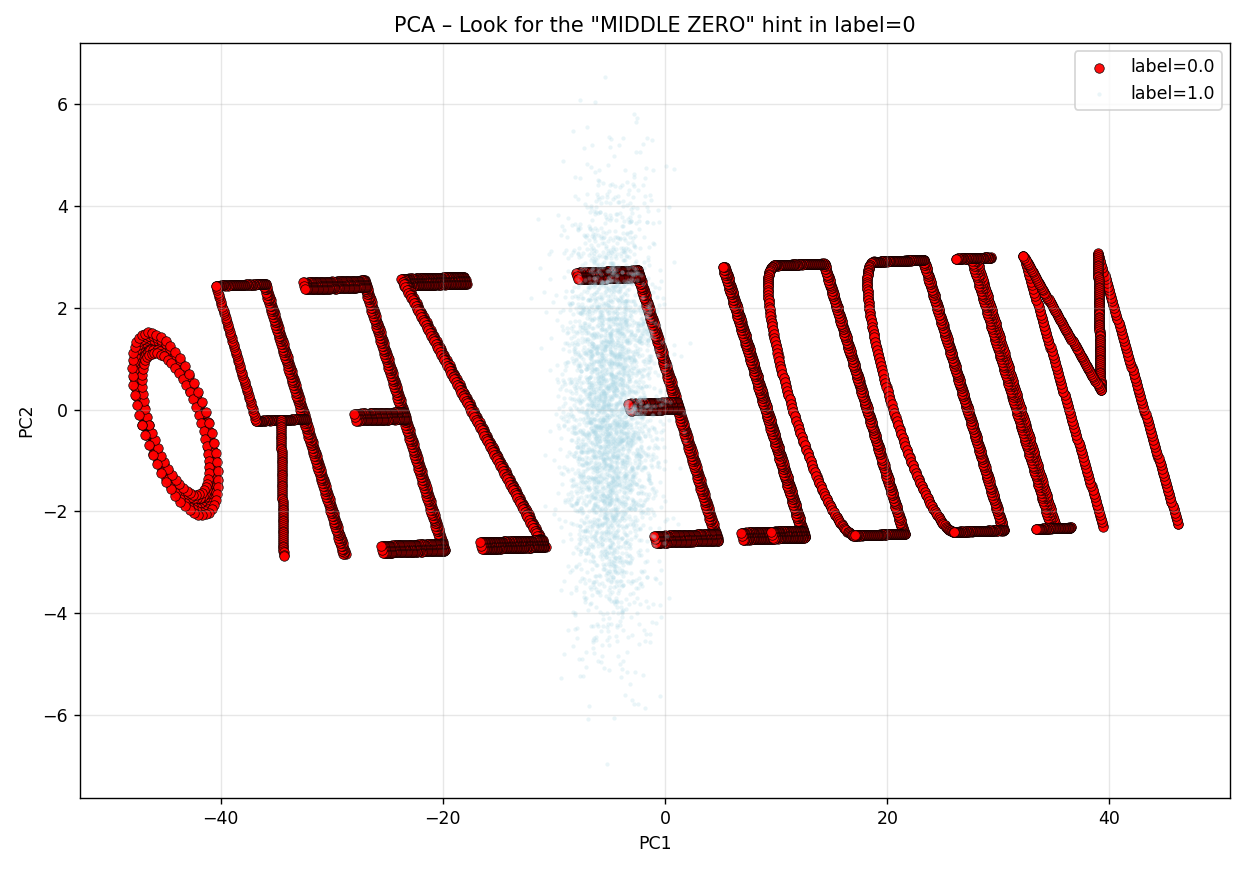
A PCA projection reveals the hint for extracting a hidden binary message from a tabular dataset.
Overview
You’re given a tabular dataset with several numeric columns and a label. Your job is to reveal a hidden hint via PCA, then use that hint to locate and decode the flag.
Phase 1 — Reveal the Hint with PCA (the “MIDDLE ZERO” text)
What to do (explanation only)
- Load the dataset and separate all feature columns from the
labelcolumn. - Run PCA on the features (exclude the label).
- Scatter-plot the first two principal components; color points by
label. - Observe that the points with
label == 0form readable text in the PCA plane: “MIDDLE ZERO” (see the provided figure). - This teaches the rule for Phase 2: look at the middle feature column (named
e) when label is 0.
Code snippet — PCA + visualization
# Phase 1: PCA reveal
import pandas as pd
import numpy as np
import matplotlib.pyplot as plt
from sklearn.decomposition import PCA

# Load data
df = pd.read_csv("dataset_new.csv")

# Split features vs. label (drop the label column)
feature_cols = [c for c in df.columns if c != "label"]
X = df[feature_cols].values
y = df["label"].values

# 2D PCA
pca = PCA(n_components=2)
X_pca = pca.fit_transform(X)

# Plot: color by label, highlight label==0 (the text)
plt.figure(figsize=(10, 7))
colors = {0: "red", 1: "lightblue", 2: "lightgreen"}
for lab in sorted(np.unique(y)):
    mask = (y == lab)
    size = 30 if lab == 0 else 6
    alpha = 0.95 if lab == 0 else 0.25
    edge = "black" if lab == 0 else None
    lw = 0.4 if lab == 0 else 0
    plt.scatter(X_pca[mask, 0], X_pca[mask, 1],
                c=colors.get(lab, "gray"), s=size, alpha=alpha,
                edgecolors=edge, linewidth=lw, label=f"label={lab}")

plt.title('PCA – Look for the "MIDDLE ZERO" hint in label=0')
plt.xlabel("PC1"); plt.ylabel("PC2")
plt.legend(); plt.grid(True, alpha=0.3)
plt.tight_layout()
plt.savefig("pca_middle_zero.png", dpi=220)
plt.show()
Phase 2 — Extract & Decode the Flag (“middle column e where label == 0”)
What to do (explanation only)
- Filter the dataset to rows where
label == 0. - From those rows, read the middle feature column
e(this is the “MIDDLE ZERO” instruction). - Interpret that column as a binary stream: values
0and1form bits in order. - Concatenate bits left-to-right; split into 8-bit bytes; convert each byte to its ASCII character.
- Join the characters to produce the final flag.
Code snippet — binary extraction from e (label 0) → ASCII
# Phase 2: Extract & decode the flag from column 'e' where label==0

import pandas as pd

df = pd.read_csv("dataset_new.csv")

# 1) Keep only the rows forming the message
msg = df[df["label"] == 0].copy()

# 2) Pull the "middle" column 'e' and validate it's binary
vals = pd.to_numeric(msg["e"], errors="coerce")
bits = [str(int(v)) for v in vals if v in (0.0, 1.0)]
bitstr = "".join(bits)

# 3) Convert to 8-bit ASCII
chars = []
for i in range(0, len(bitstr), 8):
    byte = bitstr[i:i+8]
    if len(byte) < 8:
        break
    chars.append(chr(int(byte, 2)))

flag = "".join(chars)
print("Flag:", flag)
What will appear is a link : https://pastebin.com/FHCwcAEQ. Go there and you’ll find the flag.
- Flag is: CONCTF{fRee_fLaG_F0r_yoU}
Sanity Checks & Pitfalls (explanation only)
- Make sure PCA is computed on features only (exclude
labelfrom PCA input). - If your PCA scatter doesn’t show readable text for
label==0, check for:- Accidentally including
labelamong features. - Non-numeric columns not converted to numeric.
- Plot scaling (ensure
label==0points are clearly visible).
- Accidentally including
- During decoding:
- Confirm that
evalues are strictly0/1. Drop or ignore non-binary entries. - Ensure you read bits in order as they appear (no extra sorting).
- Chop the bitstring into 8-bit groups; discard any trailing incomplete byte.
- Confirm that